


Zen Word® - Relax Puzzle Game
4.816.19K Reviews
App Specs
- Version
- 2.39.0
- Updated On
- License
- Free
- Downloads
- 50,000,000+
- Developer
- Oakever Games
- Categories
- Word
- Platform
- Android, iOS
Screenshots




 Analysis by AppCompare
On a shared phone or tablet, a word game can be an easy way for different people in the household to take a quiet break without needing to learn a complicated set of rules. I found Zen Word® - Relax Puzzle Game works best as a low-pressure, take-a-turn activity: one person can try a few letter combinations, then hand the device over when they’re ready. It is still a solo puzzle rather than a dedicated family game, so I wouldn’t expect built-in turn-taking or shared progress; the appeal is that the basic idea is easy to explain to someone sitting beside you.
Sharing a device without sharing expectations
If several people use the same device, it helps to agree on whose game session is active before anyone starts. A word puzzle can look like a natural place to pass the screen around, but a person may prefer to keep their own progress and pace. I’d treat a shared session as casual collaboration—suggesting possible words aloud—rather than assume the game keeps separate household profiles or makes it simple to divide progress between players.
That distinction matters most with children and guests. Someone can join in by looking at the letters and proposing an answer, while the device owner remains responsible for the actual session. If you want a game built around teams, a visible score, or a head-to-head match, a multiplayer word title is a better fit. Here, the quiet appeal comes from solving at your own speed, not from comparing results.
Small routines that make the puzzles easier to enjoy
I’d use it in short, natural gaps: while waiting for an appointment, during a quiet stretch at home, or as a few minutes away from a busy screen. The no-rush feel suits those moments better than a game that demands a long, uninterrupted session. One useful habit is to look over the available letters before tapping quickly; trying a few familiar word endings or rearranging the letters mentally can turn a stuck moment into a small vocabulary exercise instead of a frustrating guessing loop.
It also works well as a shared-device “one puzzle, then pass it on” activity, provided everyone is comfortable with the same session being visible. That can make the game a gentle conversation starter: different people often notice different word patterns. The trade-off is that a helpful hint from someone nearby can take away the satisfaction of finding the answer yourself, so I’d ask before offering one.
Finding Calm in the Chaos
When I first downloaded Zen Word® - Relax Puzzle Game, I was looking for something to help me unwind. Right off the bat, the minimalist design and tranquil soundscape set a calming tone. The interface is clean and intuitive, which means you don’t need to be a tech wizard to figure things out. Just open the app, and you’re greeted by a gentle soundtrack and an easy-to-navigate menu.
Gameplay
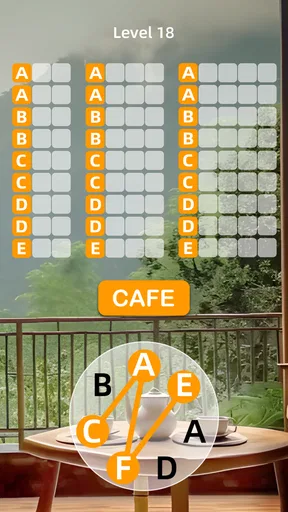
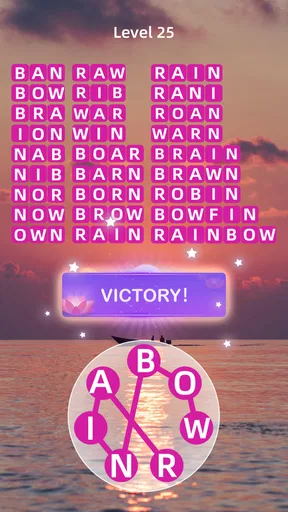
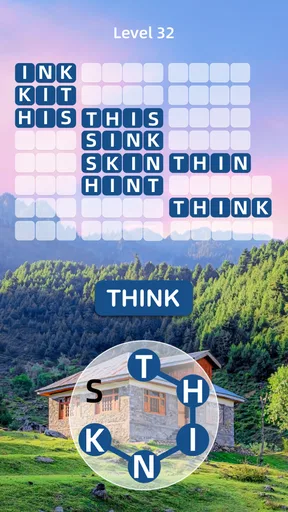
The gameplay is refreshingly simple. You’re tasked with forming words from a set of given letters. It’s a bit like a crossword puzzle but without the stress of a ticking clock. I found myself getting lost in the game, piecing together letters to form words while time seemed to slip away, bringing me closer to a state of Zen.
Worth Reading Before You Choose

Flipboard Shows What News Apps Must Do Beyond the Feed

Switching to Android Auto Means Rethinking Your Driving Routine

Google Calendar Makes a Crowded Week Easier to Manage

Ludo King Makes the Most of the Minutes Between Plans

Baby Panda World Brings Quick Play to Modern Phones, but Its Game Library Feels Busy

ESPN’s Live Game View Makes Following Close Games Easier
One feature I particularly enjoyed is the gradual increase in difficulty. It starts easy, allowing you to get the hang of it, but as you progress, the challenges grow, keeping you engaged without feeling overwhelmed. It's the perfect balance, providing a mental workout while still being incredibly relaxing.
How it fits into the word-game mix
Compared with a crossword, where clues and a grid point you toward particular answers, this letter-based format puts more weight on spotting combinations yourself. Compared with a fast word-search or competitive round, it feels less like a race and more like a quiet puzzle to work through at your own pace. That makes it a good choice when I want a light mental task, though it won’t replace a clue-heavy puzzle if I’m specifically in the mood for one.
There is a practical trade-off in that simplicity: if you want a detailed story, strategic systems, or a social challenge, the core activity may feel repetitive over time. I’d choose it for calm word-forming sessions, not as an all-purpose game. The gradual rise in challenge gives the routine some variation, but the pleasure still depends on enjoying the central loop of examining letters and testing words.
Visuals and Sound
The visuals are soothing, featuring soft color palettes and gentle animations that enhance the relaxing vibe. Combined with the calming background music, the app offers a perfect environment to unwind. I often find myself playing in the evening, using the game as a meditative practice to wind down after a long day.
Zen Word also offers a variety of themes, so you can change things up to suit your mood. Whether it’s a serene beach or a tranquil forest, each theme is designed to enhance your relaxation experience.
Practical boundaries and age context
The game is free to download and play, while optional in-app purchases range from $0.39 to $99.99 per item. I’d keep that in mind if a child uses a shared device: agree on purchase boundaries beforehand and use the device’s own purchase protections where appropriate. This is a household precaution, not a claim that the game provides family controls. Oakever Games is the developer, and the current version is 2.8.0.
It is rated Everyone, which makes the listed age context broad, but that alone doesn’t decide whether it suits a particular child or household. I’d still consider whether the player enjoys word puzzles, whether they can use a shared device responsibly, and whether an adult should oversee purchases. For younger players, playing together can be a useful way to explain that the game is a calm word activity rather than a competitive contest.
Who will enjoy it—and who may want another game
I’d recommend it to people who like an unhurried vocabulary challenge, want a small screen break, or enjoy solving alongside someone without turning it into a contest. It can suit a commuter waiting for a connection, a parent taking a quiet pause, or a household member who wants a simple activity before bed. Its 4.8 average from around 577,000 ratings, alongside more than 10 million installs, suggests that many players have found the format appealing, though popularity can’t guarantee it will match your taste.
If you thrive on timed rounds, competitive leaderboards, elaborate progression, or puzzles built around clues, I’d look elsewhere. This game’s strongest point is the easygoing pace; the same restraint can be a limitation if you need frequent changes in activity. It is also not the best choice for a group that wants everyone to play independently at once. I would use a more explicitly multiplayer word game for that, and keep this one for a shared screen or solo downtime.
Version, access, and what to expect
Zen Word is a free word game from Oakever Games, released on March 31, 2023, and its current version is 2.8.0. It requires Android 8.0 or later. The game is intended for Everyone, and its 4.8 average comes from around 577,000 ratings, with about 12,000 written reviews. Those figures give a useful sense of its reach, but the better test is whether its calm pace and letter puzzles suit the way you like to play.
For a first session, I’d try it in a quiet moment and see whether the letters invite curiosity or start to feel like busywork. If the sound is not right for the setting, you can still judge the visual style and puzzle rhythm on their own; I wouldn’t rely on a game’s audio to create calm in a noisy room. A short session is enough to tell whether the central activity clicks, and there is no need to treat it as a daily obligation.
A household-sized verdict
Overall, Zen Word® - Relax Puzzle Game is more than just a game; it’s a tool for relaxation and mental clarity. Whether you’re on a break at work, winding down at home, or just in need of a little mental escape, this app provides a peaceful retreat right in the palm of your hand.
For a household, I see it as an easygoing option when one person wants to play and others may enjoy offering ideas from nearby. It is not a substitute for a shared account system, a multiplayer word contest, or parental purchase boundaries on the device itself. I’d give it a try if a calm, letter-focused puzzle sounds appealing, and skip it if you need competition, richer puzzle mechanics, or a group game with clear turns and scores.
So why not give it a try? You might just find a little Zen amidst the letters.
Pros
- Engaging and calming gameplay experience.
- Beautiful minimalist graphics.
- Easy to learn
- hard to master.
- Frequent updates with new levels.
- No intrusive ads.
Cons
- Limited free levels available.
- In-app purchases can be pricey.
- Requires internet for some features.
- Occasional minor bugs.
- No multiplayer mode.
FAQs for Zen Word® - Relax Puzzle Game
What is Zen Word® - Relax Puzzle Game?
Zen Word® - Relax Puzzle Game is a calming and engaging word puzzle app designed to help users unwind while stimulating their minds. It offers a serene experience with soothing music and relaxing visuals, encouraging players to form words from a set of letters. It’s perfect for those looking to relax after a long day.
How does the gameplay work in Zen Word®?
In Zen Word®, players are presented with a grid of letters. The objective is to swipe through the letters to form words. As you progress, the game increases in complexity with larger grids and more challenging letter combinations. This game is designed to be intuitive, making it easy for both beginners and seasoned puzzle enthusiasts to enjoy.
Is Zen Word® suitable for all ages?
Yes, Zen Word® is designed to be family-friendly and suitable for all ages. The game’s difficulty level can be adjusted, making it accessible for children who are learning new words or adults looking for a relaxing yet challenging mental exercise. It's an excellent tool for improving vocabulary and cognitive skills.
Does Zen Word® require an internet connection to play?
Zen Word® does not require an internet connection for basic gameplay, making it perfect for offline play during travel or in areas with limited connectivity. However, some features such as updates, leaderboards, or special events may require internet access to function.
Are there any in-app purchases in Zen Word®?
Zen Word® offers optional in-app purchases. These may include hints, additional levels, or aesthetic customizations. While the game can be enjoyed without spending any money, these purchases can enhance the experience by providing extra content or conveniences for players who choose to invest in them.


